
The Wellue Smart Hot & Cold Eye Relief Device offers three temperature-based comfort modes: Active Cooling, Gentle Warming, and Hot & Cold Cycle. It is designed to help you refresh tired-looking eyes after screen time, enjoy a cooling sensation in the morning, or unwind with soothing warmth before bed.
Smart Hot & Cold Eye Relief Device FAQs
Explore everything you need to know about hot and cold therapy, device features, and everyday eye care.
Product Overview & Benefits
Learn how the device works, what each mode does, and how to incorporate temperature-based eye care into your daily routine.
What does the Wellue Smart Hot & Cold Eye Relief Device do?
What are the three operating modes?
The device offers three modes to suit different preferences:
-Cold Mode: Provides adjustable cooling for a refreshing eye-care break.
-Warm Mode: Delivers gentle warmth for a soothing, relaxing experience.
-Cycle Mode: Alternates between cooling and warming for a combined temperature experience.
Choose the mode that best suits your routine and comfort preferences.
What do the indicator light colors mean?
The indicator light shows which mode is active:
Blue: Cooling Mode
Red: Heating Mode
Purple: Cooling & Heating Cycle Mode
How cold does the device get?
The cooling temperature is adjustable from 57°F to 72°F (approximately 14°C to 22°C). You can customize the temperature through the companion app to find your preferred level of cooling.
How warm does the device get?
The warming temperature is adjustable from 100°F to 113°F (approximately 38°C to 45°C). Use the app to select a comfortable setting for your evening wind-down or everyday relaxation routine.
Do I need to put the device in the refrigerator or freezer before using Cold Mode?
No. The device uses built-in semiconductor cooling technology, so there is no need to refrigerate or freeze it before use. Simply select Cold Mode and enjoy on-demand cooling.
What is Hot & Cold Cycle Mode?
Cycle Mode alternates between cooling and warming, allowing you to enjoy both temperature sensations in one session. It is a convenient option when you want to combine a refreshing and relaxing eye-care experience.
Can this device help with puffy or tired-looking eyes?
Cooling mode provides a refreshing sensation and may help reduce the appearance of morning puffiness temporarily. The device is also designed for relaxing breaks after long periods of screen time. Individual experiences may vary.
Can I use it for dry, tired eyes?
The device provides temperature-based comfort that may feel soothing when your eyes feel tired. However, it is not intended to diagnose or treat dry eye disease or other eye conditions. If you experience persistent dryness, irritation, or discomfort, consult an eye-care professional for appropriate advice.
Does the device massage or apply pressure to my eyes?
No. Unlike traditional eye massagers that use air compression or vibration, this device focuses on cooling and warming without mechanical massage or vibration.
Using the Device
Find out how to switch modes, use the physical controls, and make the device part of your daily routine.
How do I turn the device on or off?
Press and hold the power button for approximately 2 seconds to turn the device on or off.
Can I use the device without a smartphone?
Absolutely! The app is optional for everyday operation. You can switch between modes using the physical power button, without needing to keep your phone nearby.
Once you have saved your preferred temperature and session duration in the app, the device will use those settings when operated without your phone.
How do I switch between Cooling, Heating, and Cycle modes?
You can operate the device directly using the power button:
Step 1: Press and hold the power button to turn on the device. A purple indicator light means Cycle Mode is active.
Step 2: Press the power button once to switch to Cold Mode. The indicator light turns blue.
Step 3: Press the power button again to switch to Warm Mode. The indicator light turns red.
You can enjoy your preferred mode without opening the app each time.
Will the device remember my preferred temperature and session duration?
Yes. The device follows the temperature and session duration settings most recently saved in the app. Set your preferences in advance, then use the physical power button for a convenient, phone-free experience.
Do I need to keep my phone connected while using the device?
No. The app is used to customize your settings, while the physical power button lets you operate the device independently. You do not need to keep your phone beside you throughout your eye-care session.
When is the best time to use Cold Mode or Warm Mode?
It depends on your personal preferences and routine.
-In the morning: Try Cold Mode for a refreshing start to your day.
-During the day: Use your preferred mode for a relaxing break after extended screen time.
-Before bed: Try Warm Mode as part of your evening wind-down routine.
-Whenever you prefer both: Choose Cycle Mode to alternate between cooling and warming.
Always select a temperature that feels comfortable and follow the user manual's instructions.
Is the device adjustable for different face shapes?
The device features a 180° adjustable design that allows it to flex and adapt around different eye areas for a more comfortable fit. Adjust it gently to find a position that feels right for you.
Is the device noisy during operation?
The device is designed for quiet operation, without the mechanical vibration or air-compression mechanisms found in many traditional eye massagers. It is suitable for quiet moments at home, at work, or before bed.
App Setup & Connectivity
Learn how to connect the device to the companion app, personalize your settings, and resolve common connection issues.
What is the app called?
The app is called ViHealth. You can download it from the Apple App Store or Google Play to connect your device and customize your preferred mode, temperature, and session duration.
How do I connect my device to the ViHealth app?
Follow these simple steps to connect your Wellue Hot & Cold Eye Relief Device to the ViHealth app:
Step 1: Download ViHealth
Search for ViHealth in the Apple App Store or Google Play and install the app on your smartphone.
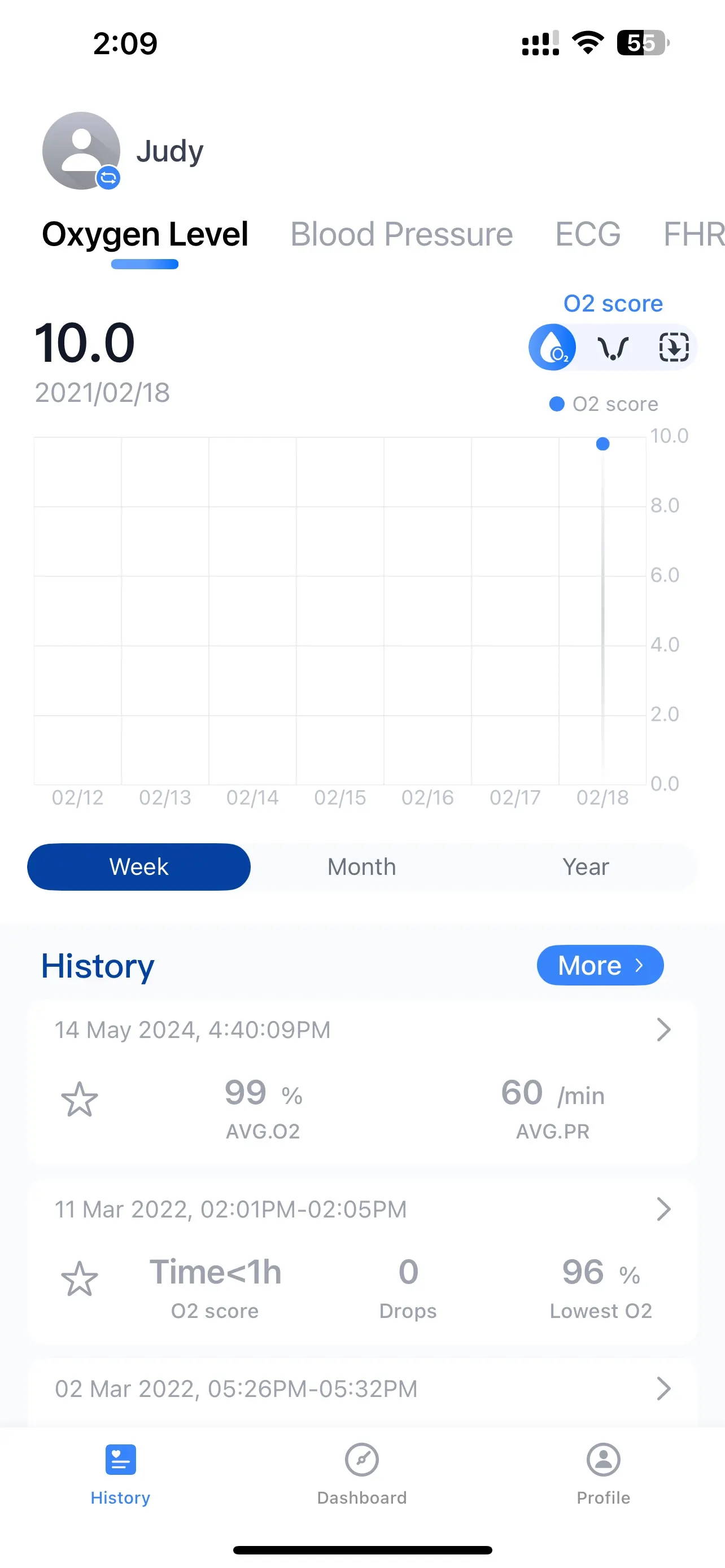
Step 2: Enable Bluetooth
Turn on Bluetooth on your smartphone and open the ViHealth app.
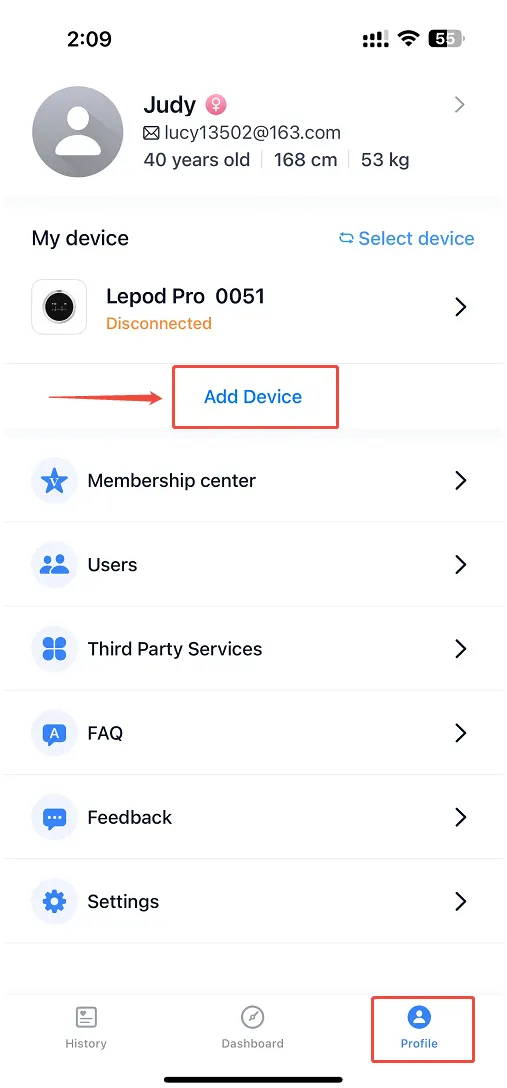
Step 3: Add Your Device
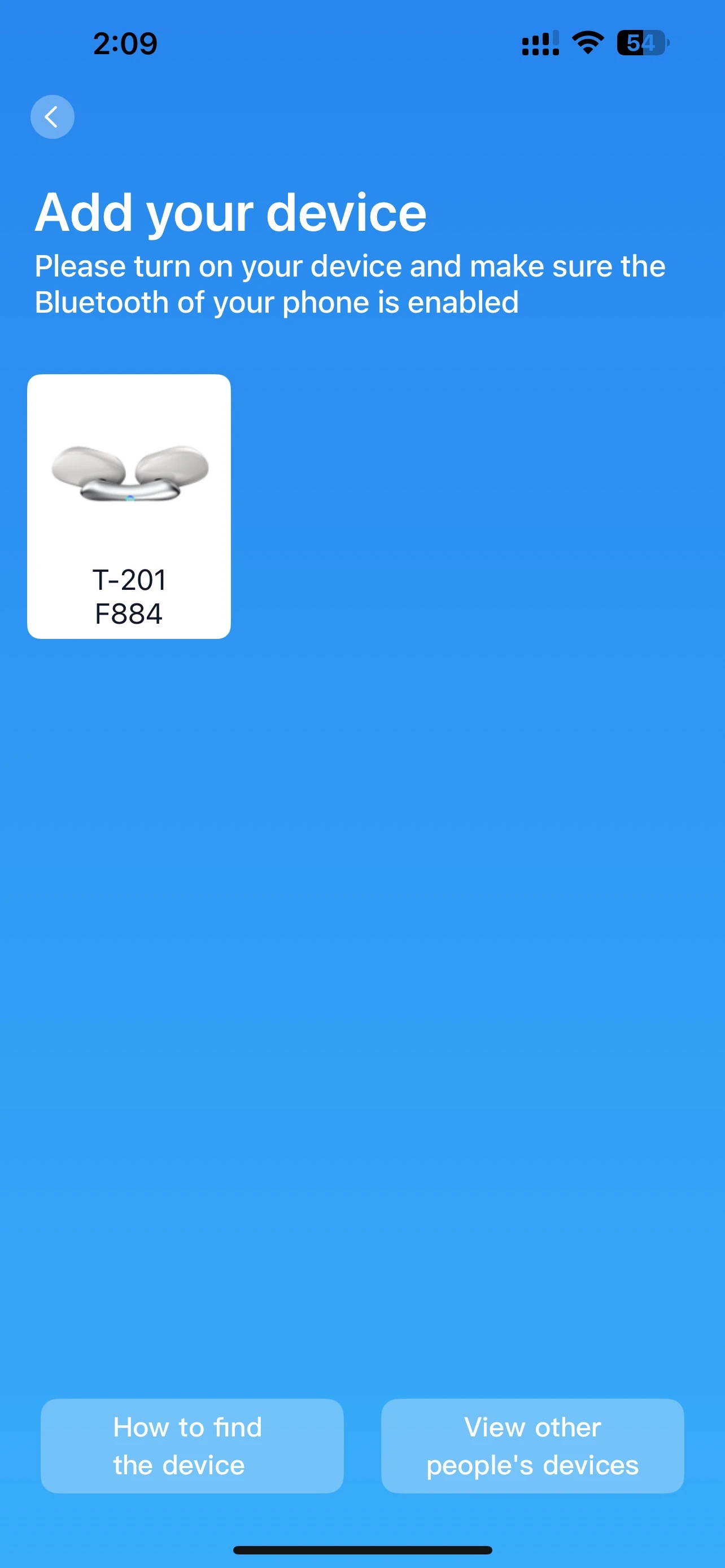
Tap Profile in the bottom-right corner of the app, then select Add Device. Choose your device model from the list, such as T-201.
Step 4: Customize Your Settings
Once connected, enter the device control interface to select your preferred mode and adjust the temperature and session duration to suit your preferences.
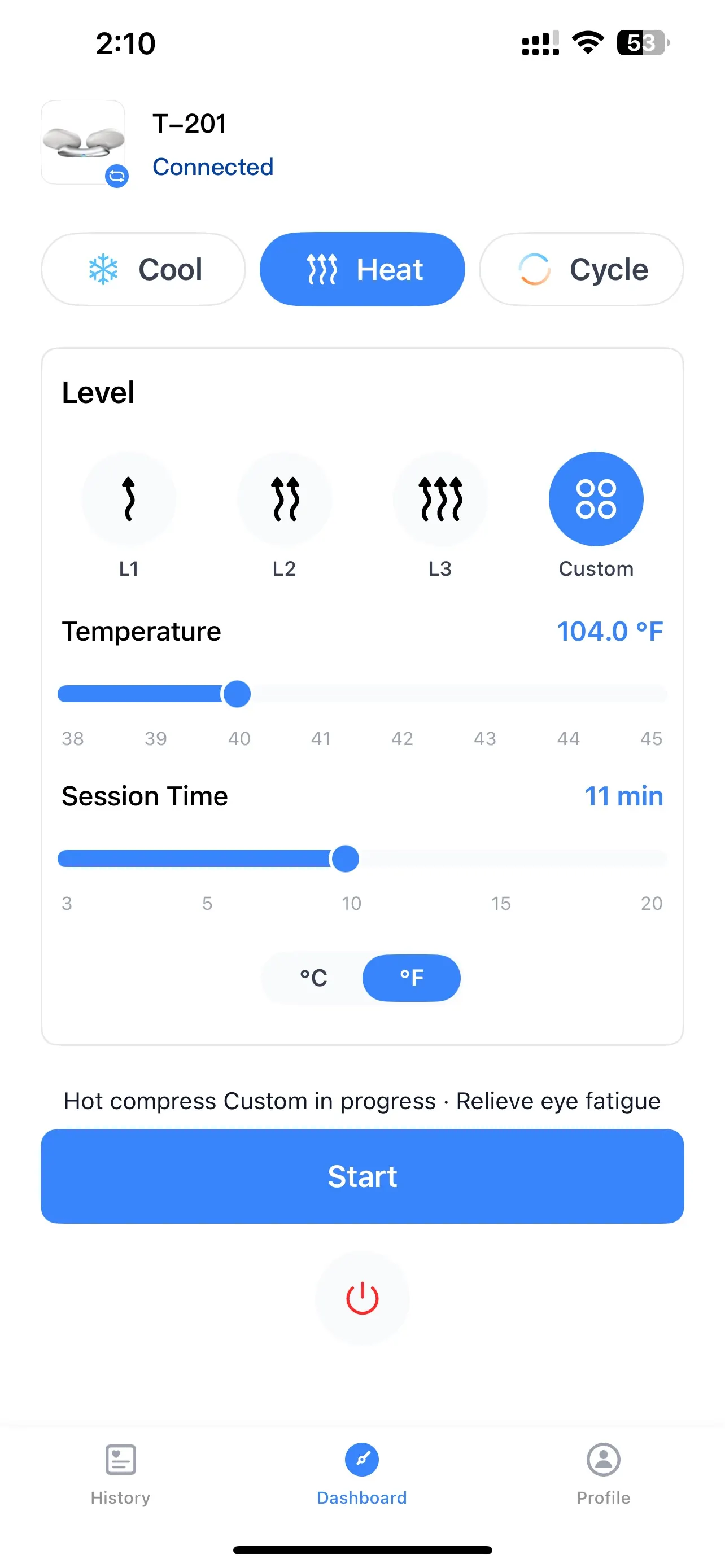
You're all set! You can now conveniently manage your eye-care settings through the ViHealth app.
Can I use the device without a smartphone?
Absolutely! The app is optional for everyday operation. You can use the physical power button to turn the device on and switch between Cooling, Heating, and Cycle modes without your phone.
The app simply provides a convenient way to customize your mode, temperature, and session duration.
What can I adjust through the ViHealth app?
Once your device is connected, you can use the app to:
-Switch between Cooling, Heating, and Cycle modes.
-Adjust the temperature to your preferred setting.
-Customize the session duration.
This allows you to personalize your eye-care routine with just a few taps.
Do I need to connect to the app every time I use the device?
No. You can operate the device using its physical power button without opening the app each time. Connect to ViHealth whenever you want to adjust your settings through the app.
Charging & Battery
Learn about charging, included accessories, and warranty coverage.
What is included in the box?
Your package includes:
- 1 × Wellue Eye Spa Pods device
- 1 × USB Type-C charging cable
- 1 × User manual
How do I charge the device?
Connect the supplied USB Type-C charging cable to the device and use a compatible DC 5V/1A charger. The charger is not included in the package.
How long does it take to fully charge?
A full charge takes approximately 2.5 hours.
How many sessions can I get from a full charge?
According to the user manual, a full charge supports approximately:
-Cooling Mode: 6 sessions
-Heating Mode: 6 sessions
-Cooling & Heating Cycle Mode: 4 sessions
Actual battery performance may vary with usage.
What do the charging indicator lights mean?
Flashing blue: The device is charging.
Solid blue: The device is fully charged.
Flashing red: The battery is low.
Can I turn on the device while charging?
No. The user manual specifically instructs users not to turn on the device while it is charging.
What should I do if I have not used the device for a long time?
If the device has not been used for more than three months, recharge it before use.
What is the warranty period?
The Wellue Smart Hot & Cold Eye Relief Device comes with a 1-year warranty. Please refer to Wellue's warranty policy for coverage details and service conditions.
Safety & Care
Learn how to use the device comfortably and when to seek professional advice.
Is this device intended to treat eye conditions?
No. The device is intended for personal care use only and is not intended for medical purposes. It should not replace professional evaluation or treatment for eye conditions.
Who should consult a doctor before using the device?
Consult your doctor before use if you have any of the following:
- Skin infections, skin sensitivity, redness, or burns
- A history of eye surgery or eye conditions such as glaucoma, cataracts, or retinal detachment
- Swelling or wounds around the eyes
- Heart conditions, brain conditions, malignant tumors, or other serious health conditions
- A medical condition currently requiring treatment
- High or abnormal blood pressure
If you feel unwell or experience unusual discomfort during use, stop immediately.
Can I use the device if I have reduced sensitivity to heat?
Use caution, as the heated surface may cause burns if you cannot reliably sense heat. Avoid using the device on areas with reduced sensation or poor circulation.
Can children use the device?
Children aged 8 and above should use the device only with appropriate supervision or instruction and an understanding of the risks. Children under 8 and adults over 60 should be supervised during use.
Can I use the device with contact lenses, glasses, or false eyelashes?
No. Remove contact lenses, eyeglasses, false eyelashes, and other eye accessories before use.
Cleaning & Maintenance
Find out when LLLT may fall outside the device’s cleared indication and when it makes sense to seek professional advice first.
How do I clean the device?
Turn off the device before cleaning. Use a soft cotton cloth lightly dampened with mild detergent to wipe the device clean.
Can I rinse the device under running water?
No. Do not rinse or submerge the device in water or other liquids.
What should I avoid when storing or maintaining the device?
- Avoid corrosive cleaners and harsh detergents.
- Keep the device away from humidity, excessive heat, and corrosive gases.
- Avoid contact with sharp objects.
- Do not disassemble or attempt to repair the device yourself.
Is the device intended to treat eye conditions?
The device is designed for everyday temperature-based eye comfort and relaxation. It is not intended to diagnose, treat, cure, or prevent eye diseases or other medical conditions, and it should not replace professional eye care.
What should I do if I experience discomfort during use?
Stop using the device if you experience pain, excessive heat or cold, irritation, or other discomfort. If symptoms persist or worsen, consult an eye-care professional.
Can I use the device if I have an existing eye condition or have recently undergone eye surgery?
If you have an existing eye condition, have recently undergone eye surgery, or are receiving treatment for an eye-related problem, consult your eye-care professional before use. Follow any specific precautions provided in the user manual.
How should I choose a comfortable temperature?
Adjust the temperature in the ViHealth app to find what feels most comfortable for you. Avoid temperatures that feel too hot or too cold, and stop using the device if you experience any discomfort.
Troubleshooting
Find quick solutions to common issues with charging, powering on, and operating your device.
Why is my device not charging?
Try the following steps:
1. Make sure you are using a compatible DC 5V/1A charger.
2. Check that the charging cable is securely connected to the device and power source.
3. Inspect the charger and cable for damage.
4. Replace a damaged charger or charging cable if necessary.
Why won't my device turn on?
Press and hold the power button for approximately 2 seconds. A brief press alone will switch modes rather than turn the device on from the off state.
If the device still does not turn on, check the battery level and recharge it as needed.
Why does my device stop working after use?
The device has built-in overheating protection. If this protection is activated, allow the device to rest for approximately 30 minutes before trying again.
Avoid using Cooling Mode repeatedly without allowing sufficient time for heat dissipation.
Avoid using Cooling Mode repeatedly without allowing sufficient time for heat dissipation.
What if the device still does not work?
If the problem persists after following the troubleshooting steps, contact Wellue Customer Support at support@getwellue.com. The support team aims to respond within 1–2 business days.
Still Have Questions?
We're here to help. Contact Wellue Customer Support at support@getwellue.com for assistance with your device, charging, or everyday use.