
8-Inch Touchscreen Patient Monitor with Printer: 34 Arrhythmia Analyses, Settings & Review
Arrhythmia monitoring is most valuable when clinicians can do three things quickly: detect, configure, and review events with ECG waveform context. The 8-Inch Touchscreen Patient Monitor with Printer supports 34 arrhythmia analysis types and provides dedicated tools for ARRHYTHMIA SETTINGS and ARRHYTHMIA REVIEW to help standardize alarm behavior and streamline event validation and documentation.
What Arrhythmia Analyses Are Supported? (34 Types)
1) Supraventricular (SV)
- Afib1(c)
- Afib1(f)
- Atr Flutt
- Sinus Arr
- Missed
- Atr Tach
- P Atr Tach
- Nodal
- SVT
2) Rate Limit Events
- Tachycardia
- Extreme_Tachycardia
- Bradycardia
- Extreme_Bradycardia
3) Premature (PREM)
- PAC
- PNC
- PVC1-LV
- PVC1-LV Early
- PVC1-LV RonT
- PVC2-RV
- PVC2-RV Early
- PVC2-RV RonT
- Multi PVCs
4) Ventricular (VENT)
- PVCS 6/Min
- PVCS 12/Min
- PVCS 24/Min
- Freq MF
- Bigeminy
- Trigeminy
- Pair PVCs
- Run 5 PVCs
- Run 11 PVCs
- V Tach
- Asystole
5) Conduction (COND)
- 1st DEG BLK
How to Configure Detection (ARRHYTHMIA SETTINGS)
1. Select Tools in the Main menu, and then select Arrhythmia. The following menu appears:

2. In this menu, select Arr Setting, the following Arrhythmia Alarm Setting dialog box pops up.
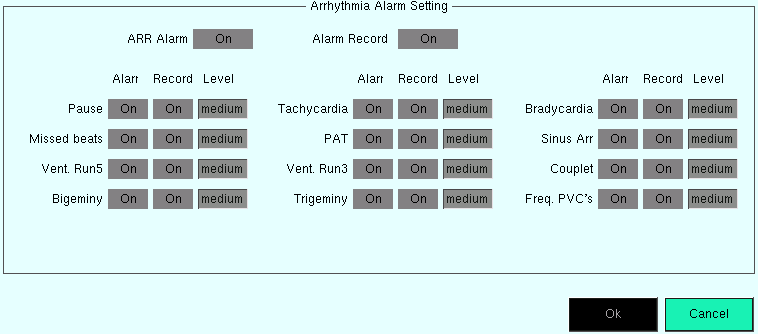
3. In this dialog, you can perform the following settings. The Alarm field indicates the alarm on/off status and Record indicates the alarm recording on/off status. You can change the settings as described below.
- ARR Alarm: All Arrhythmia alarms on.
ON: Enables all arrhythmia alarms. When the Arrhythmia alarm occurs, the monitor gives alarm indications and saves the alarm.
OFF: Disables all arrhythmia alarms that can be disabled. When the Arrhythmia alarm occurs, the monitor neither gives alarm indications nor saves the alarm.
- Alarm Record: All arrhythmia alarm recording on.
ON: Enables the recording of all arrhythmia alarms. The vital signs monitor starts recording when the Arrhythmia alarm occurs.
OFF: Disables the recording of all arrhythmia alarms. The monitor does not record when the Arrhythmia alarm occurs.
- Alarm and Record for 12 Arrhythmia Options: An arrhythmia alarm for each option individually.
ON: When this Arrhythmia alarm occurs, the monitor gives corresponding alarm indications and saves the alarm.
OFF: When this Arrhythmia alarm occurs, the monitor neither gives corresponding alarm indications nor saves the alarm.
How to Review Events (ARRHYTHMIA REVIEW)
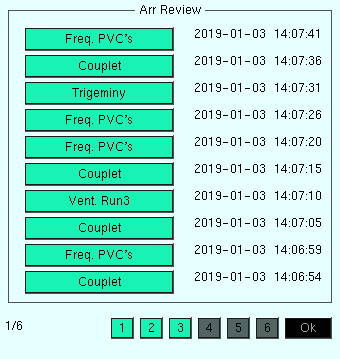
When an arrhythmia is flagged, speed matters. The ARRHYTHMIA REVIEW function is designed for fast validation and documentation.
Note:
Arrhythmia event records may be cleared after power-off—review or export data before turning off the monitor.
Selecting a certain arrhythmia option in the recording list opens the following window, such as the first one in the first page.
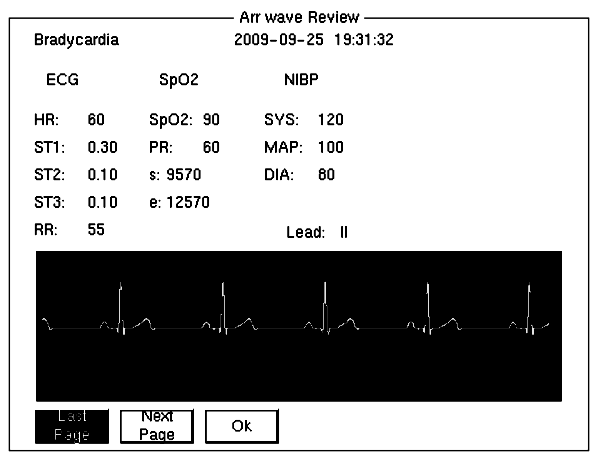
The waveform and the time of a selected arrhythmia event as well as the parameter values at the event time are displayed respectively 5 seconds before and after the alarm.
Last Page/Next Page option allows you to page up and down to review the waveform and the parameters of other arrhythmia events.
EXIT option allows you to return to the Arrhythmia Review window.
FAQ: Your Questions Answered
Q: How many arrhythmia events can be stored?
A: The 8-Inch Touchscreen Patient Monitor with Printer can store up to 500 arrhythmia events, each with the corresponding waveform for review.
Q: How much history can it store?
A: The 8-Inch Touchscreen Patient Monitor with Printer supports up to 360 hours of historical data storage (based on system settings and use conditions).
Q: How many alarm events can be stored?
A: The 8-Inch Touchscreen Patient Monitor with Printer can store up to 1,000 alarm events, each with the corresponding waveform (all alarm events).
Q: How many NIBP measurements can be saved?
A: The 8-Inch Touchscreen Patient Monitor with Printer can store up to 1,500 NIBP measurement records for quick lookup and documentation.
Final Thoughts
In arrhythmia monitoring, speed and clarity matter. The most useful workflow is the one clinicians can follow consistently: set detection rules, capture events, and review them with ECG waveform context—without slowing down bedside care.
With 34 Arrhythmia Analyses, plus dedicated Arrhythmia Settings and Arrhythmia Review, the 8-Inch Touchscreen Patient Monitor with Printer helps standardize alarm behavior and streamline event validation and documentation across daily monitoring scenarios.
Want to explore a patient monitor built for efficient arrhythmia review and documentation?
👉 Explore the Wellue 8-Inch Touchscreen Patient Monitor with Printer — clear views, robust analysis tools, and a workflow designed for clinical use.
Related Products
Related Products